Monday, June 14, 2021

About

I believe I have had enough of the About Me Gadget...

...which from 2020 reads "Labelled: Mica, Michaelina, Mike, moonflowerdragon, Mum, dag; I am a librarian who values compassionate communication and constructive critique. 2012-2017 I experimented with self-hosted Wordpress, then came back".

My "About Me" gadget at end of 2020, thanks to Wayback Machine.

I cannot find a record of what was originally in the gadget, but by 2011 it contained:
"LibraryCode1.0:[LRSStAInD+8GenR++*lsfmrjneN++B4TP+ Cs+IT+Cat++Ma+Ddc+RFdivs]" which you can if you wish Decode thanks to Wayback Machine's archive of an old ALIA page about LibraryCode1.0

My "About Me" gadget in 2011, thanks to Wayback Machine.

For the fun of it in 2021:
LibraryCode1.0:[ClRTPInD8GenR++*smrN++B4TP+Cs+IT+Cat++Ma+Lcc+Ddc+]

Sunday, January 17, 2021

Re-routing mid-journey (WP-->Blogger)

20210117
  • Haven’t done as much shifting as I’d have liked. 
  • Received another reminder about WP host renewal coming up in 29 days. I won’t get it done in time with the current plan. Began wondering whether perhaps I could split the plan, 
  1. Focussing on getting my content out ; 
  2. (later) uploading to Blogger. 
  • To be able to do 2 the way I want I will need from and for each post:
    • Webarchive link of original post (except for drafts)
    • HTML of original post (prob save to Notepad files)
    • Capture images

To celebrate the idea, here is a photo I took on this day 5 years ago - this time of year being a jigsaw fest with GUF.  Hm, I was going to embed it from my Flickr account; *but* Flickr has been at risk in the past, and while it has so far survived, it might not, so perhaps I ought not rely on it. 

While doing this, I'm also going to see whether HTML 5  figure element will let me align a caption as I wish:

1000 piece jigsaw of a bridge and cottage in photo titled Llanwrst, North Wales, by Andy Williams, published 2014 by Crown & Andrews {Leisure Wise} : Rydalmere, NSW

Thursday, December 31, 2020

Re-orienting mid-journey (WP-->Blogger)

lego hiker with map and compass
Image by Andrew Martin at Pixabay

[Copying from My Wordpress to Blogger Google Doc]

2020-12-23

  • Preparing to move a quite long post I was distracted by 
    • Wondering and discovering auto TOC is possible - before remembering that just moving it all is the goal for now.
    • Contemplating blogger thumbnails & WP featured images - learned from MaryC.fromNZ and Deepak Kamat over at webmasters.stackexchange about ‘handling’ Blogger’s choice of image to use as thumbnail.  As Blogger would use the first of my own images in the post, either make sure that’s worthy of thumbnail or insert one higher up perhaps with some css style to hide it.

2020-12-24

  • Reflecting that already I glimpse trials and tribulations others’ mentioned. Already tweaking the plan, and fairly sure my creativity would not extend to entertaining anyone with my step-by-step, I postponed deciding whether to blog it, and started a Google Doc (basically turning the plan into a repeatable procedure, and capture reflections) 
  • Decided to prioritise posts most viewed at the old place, and finally worked out how to get a list from Jetpack of posts and their #views that I could copy over to the doc which conveniently links to each post. 
  • Third post copied (the post most viewed over there (4219 views! -- It did contain 65 external links! and no I started but didn't check them all) :
    • Minecraft in public libraries for teens and young adults @lgreenpd
      • pleased/surprised to find the kwouts are still deliverable, even though I can't find the developers anymore. 
      • Frustrated with Blogger editor's behaviour in toggling html/compose though: I could not switch to Compose without removing "</area>" ; yet everytime I had to switch to HTML the interface reinstalled "</area>" into the kwout map even though the post would not save because it claimed that was bad html!
      • Major complications copying over the Comments and Pings!

2020-12-25

  • Planning to move the fourth post, I started a Google sheet to note which I have copied and why and the difficulties each presented (+ to capture a bunch of numbers, of comments, pings, internal/external links, images, kwouts).
  • Copied over

2020-12-26

2020-12-27

  • Spent a bit of time thinking about the drafts never posted
    • Copy/pasted 3 page list of drafts to sheet, then cleaned the data, deleting columns, Find/replace extranei ; sort by Category, tag and then date because category and tag mean I once thought it relevant to include, recency is not so important.
  • Notepad refines the procedure = 
    • old in html, copy, paste into notepad, then cut piece by piece into new post in html

2020-12-31

Sunday, December 27, 2020

Image Use ethics - CC0 and photoscraping sites

Two issues 

  1. what is our responsibility for proving right to use images?
  2. can Google prevent photo scraping sites from landing higher in search results than original sources?

Should we say where we get an image even if it is in the public domain?

If we find an image via Google's image search with the licence Tool set to filter by Creative Commons licence?

I wanted an image to convey my mid-journey step in which I refined my plan - and I thought of orienteering with map and compass.  Found great lego orienteer images, but could not find who had made them available, (Google-search-filter)-allegedly by CC.  

The one/s I liked appeared (and I list here not really to shame, but to show how far I explored looking for the image creator):

With licence statement but no link or credit at:

  • (Copyright Creative Commons CC0) ecoparent  - so I quickly checked on what CC0 means, and learned that if one is not the creator one should not label it as this site did.

with no copyright/licence statement or photo claim/credit at:

Then I briefly thought I had found the source - where it appeared to have been released into the Public Domain with CC0...

Screensnip of the CC0 claim by scraping site, see it yourself at webarchive

 - and where EXIF data is given as if shared by the creator. But still I wondered - particularly as there is no id for the photographer even though I would have to register to download the image. Is the site (pxhere.com [ph]) legit?

So I googled that! 

 is pxhere legit

and found I was right to be suspicious: 

Photoscraping sites are not hard to detect.

Alan Levine shows how one scraping site had scraped an image from pixabay. A clue that a site is probably a scraper, he mentioned, is the lack of identification of the contributor.  Later in the post Alan discussed how a CC-BY image he had on Flickr had been picked up by [ph] who claimed it as CC0 - an outright lie.

Now I suspect [ph]'s short url indicates they've probably even renumbered photos they scrape so I couldn't just swap out the domain, so I picked a few keywords and searched pixabay. Sure enough, there the image appears to have been created and shared CC0 by Andrew Martin (aitoff) 

lego hiker with map and compass
Image by Andrew Martin at Pixabay

Aside - I am only 90% happy with the (optional for CC0) attribution phrase pixabay provides - they link fine to the user, but not at all to the image - so I edited the html, and hope they reconsider their default setting. 

Google lets scrapers float up

Although the first image-scrape Alan discussed were images given to the public domain, the problem he describes is that Google lets photoscraper sites float to the top of their search results.  I believe Google ought to find a way to prevent that.  

Regardless, I would prefer to see everyone cite where they obtain the images they use online - particularly organisational sites like schools! Can we consider it a moral responsibility? I do. I also do not believe the difficulty of finding the true creators of public domain images releases anyone of that responsibility.  

Creators: don't join scraping sites like [ph] 

"It is impossible to delete your photos and your account, support simply ignores all requests. As a photographer, I highly do not recommend this service, a lot of photos are used with copyright infringement!" -- Danila Perevoshchikov 3 March 2020 at Facebook


Friday, December 25, 2020

Creating a Circle Desktop shortcut icon

Short version (what I did):

  1. make circles with transparent backgrounds in Powerpoint.
  2. and layer one image over another in Irfanview
  3. then convert with IrfanView to make a desktop icon
  4. and only then learn about icoconverter.com which I know can do 3 and suspect can do 1

Long version:

Retrieve five year old (2015) posts about making desktop icons

.., find a tool I learned about then is apparently a deprecated project, so lots of relearning...

goal

I wanted to show and tell my "customised a desktop icon to my own Flickr" story but the dots are trademarked by Yahoo. I don't know if that would mean one couldn't show non-commercial images incorporating the dots - but I also don't want to spend the time checking, so I erred on the side of caution.

For illustration I contemplated other icon customisations. Say, place the ALIA starry thing in the centre of a Chrome circle for the shortcut to my ALIA PD Drive folder. But - mm no - Chrome is probs trademarked too. I might still do it to practice the technique, but won't show it :-(

I wanted to layer two side by side coloured circles over my scaredydragon and have the combination in a circle with transparent background as an .ico file.

What I did

So while I can't show you the end result, I can share videos to illustrate what I learned.  

Also note it took many rinse and repeats to select the precise portion of the picture (the dragon's face and ears) that I wanted to show in the eventual circle, into the necessary part of the intervening square. And for the memory file, that involved, in IrfanView:

  • load image (open folder) browse
  • (too small , resize up =Ctrl+R or Image > Resize/Resample
  • I only want his face, so Shift+C Create Custom Crop Selection size 256 x 256 *
  • --repeat those steps until the original resize was such that the custom crop grabbed what I wanted.
  • Saved that square (can't remember how)

* because:

"Microsoft recommends using an icon with a size of at least 256×256 pixels, to ensure it is properly displayed in the Large icons view"--Digital Citizen.

Next

  1. Paint's dropper tool let me grab the exact colour I wanted, to create two squares that I could copy paste into:
  2. Powerpoint where (thanks to Articulate 360 I now know how to convert them to circles with transparent backgrounds.

  3. While I couldn't work out how to save both together still with a transparent background in Powerpoint, Kevin Stratvert showed how to remove a background from a picture with Paint3D.

Back to IrfanView,

  • Edit Insert overlay/watermark image
  • ... centre,
  • 0% transparency gave me the effect I wanted

Next step back to Powerpoint to get another circle, but Powerpoint won't save it as an .ico.

So I went back to IrfanView to change the png to .ico, but the conversion seems to have left a jagged edge. Still ... I am super happy I have an ico that makes my desktop shortcut icon visually meaningful.

Update: I've since found the png-ico conversion is easier with ICOconvert recommended by Maraksot78 (video: How to Create Custom Desktop Icons (It's Easier than you Think)) (although as mine was just one image png to ico convert, as asked, I used the old ICOconvert homepage).  

When I look more at ICOconvert online it seems they also offer cropping and Styling which includes circles - so I wonder if the special shape styles come with transparency?  Maybe I'll try it out soon.  No hurry because I did try their tab for "Multiple PNGs to one ICO" but it had no upload mechanism.

Thursday, December 24, 2020

Bless Blogger embracing p tags

When Open Live Writer stopped working for me I sulked in hiatus. While submitting my latest CPD I felt the faintest spark of blogging urge again. And then came the reminder that I'll be paying for that other blog again soon. 

So I googled doubtfully for a Google-Blogger <p>shaped miracle. 

-site:pinterest.* "blogspot" paragraphs

{Aside: Query for Google: can their algorithms be clued in to prioritise pages dated after June 2020 on  any search including Blogger or blogspot?}

Guess the contours of my curiosity when I spied in the results, dated June this year:

Google's NEW Blogger Interface does not ... MAKING A MARK

@Katherine Tyrrell, Thank You. Not only has Katherine been so persistent with Blogger that she was around to experience the new interface - she also didn't hold back in her critique and she courteously linked to the Official Blogger Blog's (apparently tardy) Announcement. Although neither specifically mentioned p tags and appropriately spacing paragraphs, I cautiously began to hope.

Hope waxed and waned : 

Yay every ENTER a paragraph,
Oh No how do I get it to stop?,
meh Okay that's how to switch to html,
what's with the blank lines?,
oh great I can copy across the kwout,
OMG why does it keep re-inserting </area> inside the <map> every time I switch back to html-edit? Seriously, I have to go back to html to insert a <hr>? (Good grief!),
Hhmmm?
.....[eventually]... right well okay that wasn't a really bad nightmare,

So let's post how excited I am about the <p>-respect,

OMG why is it not now doing the paragraph thing?
Oh I have to switch that there from Normal to Paragraph...
every time? Why?
[and later] but not anymore?
WTF is going on?

And now hours have slipped away!

Monday, July 29, 2019

Getting Pinterest out of Google Results by default

Too often my search results have been cluttered with useless results from Pinterest. Generally when I search I want informative results and unfortunately when Pinterest pops up if there is any useful information behind a Pinterest result it will take a long click journey to find it.

So today I went looking for a way to exclude pinterest by default.

The solution for me (Thanks Benjamen Lim) is browser based: a Chrome setting.

For my own future reference I’ve detailed things Benjamen didn’t, but left out some explanations he gave that you might like to read.

  1. In Chrome, go to Settings>Manage Search Engines.

  2. Find Google, click the stacked dots at right.


  3. Click Edit (if Google is your default search engine, Edit is the only option available under the dots)


  4. Although the URL is greyed out, we can double click and Ctrl-A to select and Ctrl-C copy.
    Screenshot shows greyed out but selected URL

  5. Now where Benjamen Lim moved straight to Adding a new engine, I figured:
    “the URL is long but the box containing it small”
    so I opted to open Notepad to paste & edit the URL there before copying the new version and taking it back to add the new engine.

    However, the spot to edit in the URL (after ?q=) is only 20 characters from the start of URL

  6. Whether in Notepad or the Adding engine box, after pasting the copied URL find the spot between ?q= and %s& and add in
    +-site:pinterest.*+ after ?q=.
    and Save.

  7. Find the saved engine in the non-default list and make it default (through the stacked dots)

PS

If you’re wondering how I captured the cursor and pointer in my screenshots, the answer is IrfanView, recalled by revisiting my post [in other blog].

PPS

My republish-worthiness meter will be refined because republishing that post about IrfanView took a very long time.

Testing OpenLiveWriter’s connection

So, last time I tried to post here from Open Live Writer (I am vaguely recalling) it failed with an intensely frustrating lack of explanation.

The recollection is vague because it was so long ago, resurfacing patchily now that the same thing is happening again.

Today I stumbled upon a possible explanation and maybe a fix by Dave Burdick . {Crossing my fingers}

Now when I’ve hit publish (several times today)
If the pop-its_gone (is there a better word for a message box that doesn’t hang around long enough to be read?)
___ might have been the error message Dave refers to
&&& for which the solution appears to be loading images to a Google Pictures file before copying into the post
=== then will I finally throw in the towel on blogging ?

Before I go messing about with Dave’s suggestion, I’ll see whether I can at least post without pictures.

Tuesday, November 06, 2018

I Ravelrise too

*A note on the headline – I like to verbify nouns, but I am not the first to do it for using Ravelry. That distinction, Google answered, might go to Sof Frankenstein .

Other neologisms or niche lingo might pop up herein.  Answers and amusement might be found in Ravelry wiki’s Glossary.

Soon after mum was diagnosed and I started spending my off-work days with her, I picked up knitting. 

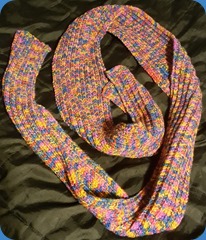
A scarf,

MicaKnitd1-Scarf

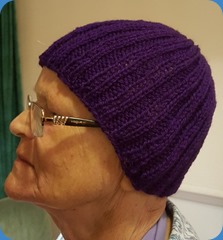
a few rectangle—>beanies,

MicaKnitd2-Beanies

and I wanted to try some more appealing and more challenging projects.

A circle scarf with more complex stitch-sets,

MicaKnitted3-ScarfCircle

reducing for a shaped beanie crown,

MicaKnitted4-BeanieCrowned

its spring so a lacy sunhat….

MicaKnitted5-SunhatLacy

So naturally, I bet you can guess where I started learning the myriad refinements (once I had exhausted my mum’s knowledge and that on her shelf)?  _______ , _____ and _______ _____ 

Very soon I wanted to blog what I was learning, but it is just not easy enough.  Perhaps if I find a mobile app that could substitute for OpenLiveWriter (Don’t tell me about any apps that use Bloggers’ own html-disrespecting post-editor).

Much of what I learned was either from, or linked in some way to, Ravelry.  So why not give it a go?

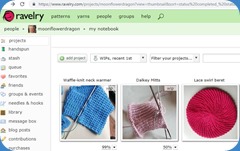
Ravelrising20181105

Oh my, what a bounty!

At the time I had not a thought for its potential contribution to my professional development as a librarian. But of course now that I start a post about “my knitting” in this blog, and think about the blogs usual themes, the connections pour out.

  • It is a niche social network (tag:web 2.0 tools) and I expect to spend some time evaluating its features and usability.
  • Some of our library’s Yak&Yarners are already Ravelry members, if not avid users, and I’m wondering whether there might be Ravelers in the area who might enjoy meetups at the library.
  • Learning journeys through thrills and spills
  • Transferability of problem recognition, analysis and recovery, (aargh that can’t be right, why?, what if?, tinking)
  • I’m even using Googlesheets to chart & calculate patterns

Tell me about your hobby-learning?

Saturday, January 27, 2018

My take-aways from “How Do Some Women Find Their Way Through the Labyrinth” [to become leaders]

Chapter Ten is the only chapter I read of Through the Labyrinth : The Truth About How Women Become Leaders .  The titles of other chapters did not convey any likelihood of saying anything different from prevalent information on their title topics (glass ceiling, discrimination, comparisons to men…)

So:

“First Principle: Blend Agency with Communion” … citing Dawn Steel “… a tough balancing act, … gauging how to juggle my masculine side and my feminine side… where the lines how to be drawn. In your dress, in your talk, in your body language, for starters.” (p.163)

  • “establish an exceptional level of competence as a leader because… [exceptional level]… needed to convince others she is equal to men…it isn’t fair, but women often need to be exceptionally good to be credited with the abilities of less competent men… ‘Perform beyond expectations’… Deliver more than people expect. Impress over and over again… build a track record” (p. 164)
    • eg “gain superior task knowledge”
    • eg “be exceptionally well prepared for meetings and negotiations.”
  • “Leaders competence derives from a confluence of tasks involving monitoring, advising, encouraging, directing, sanctioning, and solving both interpersonal and technical problems… etsablishing a record of competence in such activities requires the cooperation of followers.” (p. 164)
  • Will need to seek out and put yourself forward for more challenging scenarios (which are not usually offered to women) in which to demonstrate the above, even though that may seem (from cultural expectations only of women) ungenerous and selfish. “Finesse the double bind… by combining assert[ion] with kindness, niceness, and helpfulness.” (p. 164)
  • When directing, and being assertive and decisive – do so with warmth (smiling, looking at people rather than away) & per example from Hilary Clinton, arrange environment to give warm appearance (eg children at event – what other environmental factors could be arranged to balance a woman’s assertiveness with warmth?) (p. 165)
  • “encourage subordinates and reward positive contributions” without coming off as inappropriately mothering. (p. 165)
  • may be particularly effective in situations requiring transformational leadership, eg Meg Whitman (eBAY) “known for listening to her company’s customers and employees and thereby running a flexible and responsive organisation.” also ref Cynthia Caroll (Anglo Mining) and Amanda Burden (New York City Planning Commissioner) (p. 166)
  • in Highly Masculine / “hyperagentic” settings the above recommended blended approach will either be less likely to be effective , or face greater challenges, wish such attributes perceived by some as weakness, eg Angela Merkel “So much passivity makes you wonder whether she will be able to make decisions quickly when teh going gets tough…brought a dose of discussion, discretion and collegiality” (p. 167)
  • “avoid crying when upset” (p. 167/168)
  • “not every good leader is universally liked .. women should lead in an assertive, competent manner, accompanied by especially nice, friendly behavior only to the extent that it does not undermine their authority” (p. 168)
  • Take Credit for Accomplishments … “in a friendly and collaborative manner” (P. 168/169) eg call attention to your excellent proposal by inviting others to react to the suggestion and help her develop it further. Or when accoladed, acknowledge help of collaborators while accepting personal credit.
  • If you see men taking credit for women’s proposals say something like “John I see that you agree with Emily’s suggestion. Emily can you tell us more about your idea?” (p. 169)
  • Overcome reluctance, INITIATE negotiation over salary (after obtaining “as much information as possible about typical salaries and benefits”), and in doing so “present a alance picture displaying both task competence and social skills”,  (p. 171)
  • Either choose to work where your values are shared, or be prepared to feel somewhat inauthentic when you must represent values you do not hold.

Second principle: Build Social Capital

  • Join and participate in networks, both male and female, even though it will often mean doing it yourself almost all of the time (p. 173)
  • Find a good mentor (male most likely will result in higher compensation), both informally and formally. (p. 174)
  • Form good relationships at all levels (above, same and below) (p. 174)

Sunday, December 10, 2017

There and back again: returning to Blogger from self-hosted WordPress?

Bilbo: Back again... [water colour by Kinko-White] beautifully conveys how I feel about coming home to this blog after my adventure in self-hosting elsewhere

Who cares?

I hope anyone else who lands here after pondering whether to switch from Wordpress.org to Blogger comments below – so we can compare thoughts. Were you wondering how, or why? Are there as few articles about that journey now as there were when I searched--let alone any promise of ease in such a transition?

During my search for tips back in July 2017 I found that my experiences and rationale almost totally matched Jenn’s Wordpress—>Blogger transition story, even to the fact that Google assumed I really meant to ask about switching the other way. (Did hers happen in 2014, or was the post re-dated when she shifted it with her blog, Hello Brio over to Squarespace?)  Like Jenn, I want to tell you why ; and in case she decides to ditch that post, I will reflect on her suggestions.

Why I decided that the experiment with self-hosted Wordpress was over

--posting infrequency + not finding the right handle for a static portfolio = insufficient value for $$$
--under my name = wanting it to be perfect
--struggle to get it "just right" too time consuming
--needing to spend less time at the computer

Why I am switching [back] to Blogger from Wordpress (despite the p tag issue).

  1. Nostalgia.  I loved learning to blog here, and have fond memories of when some of my posts made a difference to people.
  2. I still have a hefty collection of posts here, which people are still reading.
  3. It is free.
  4. I think Blogger can do more now than it did then, but I do not need most of the extra functionality self-hosted Wordpress could do.
  5. moonflowerdragon.blogspot looks better on mobile than micameerbach.com
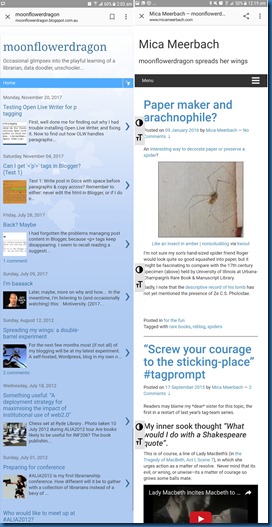
moonflowerdragon_v_micameerbach on mobile screens

As Jenn suggested, I reconsidered my goals:

  • Return to one FREE online spot
    # no particular deadline, although the sooner it is done the sooner I can stop paying for the other domain, yet let’s give enough time to be sure it will work comfortably.
  • See whether I return to posting more frequently under the pseudonym
  • It was always about skills/professional development, and it still is, with a few new questions:
    • What would it take for a blogspot site to be a professional advantage rather than the opposite?
    • How much of that which I did at micameerbach will remain relevant if republished?
    • Are any of those posts that stayed so long in draft worth actually posting?

How I plan to switch from Wordpress back to Blogger = Slowly

Tracy Thomason over at 15 Minute Monday posted about exporting one’s files to move from Wordpress to Blogger.

However, I figured that as I would need to check each post for peculiarities anyway, I might as well consider each of the 111 posts (61 published, 49 drafts, 1 private) manually.

Those peculiarities?

  • both Jenn and Tracy mentioned that image URLs don’t transfer
  • inbound links would be broken
  • internal links would be broken
  • comments would have to be exported or mapped over

First: I made sure that the Internet Archive WaybackMachine is capturing micameerbach occasionally – some busy posting months were not captured at first, but the Internet Archive WaybackMachine lets us add.

Second: This post here, and a (semi)final post there

Third: Up to 111 iterations of:

  1. Pick a post, either the next highest viewed, or any post,
  2. Check whether its URL is cited anywhere else online.
  3. Read it,
  4. Consider: does it offer or demonstrate anything useful?

If it is worth transferring,

  1. in html view, copy and paste everything across to a new post here, but in Open Live Writer (unless Google decide to support p tags in their Blogger editor),
  2. append note about where I had originally posted it, perhaps hyperlink to archive version?
  3. reupload photos and basically re-link everything.
  4. retag & add tag Republished_from_micameerbach
  5. Do not try to anticipate whether formerly internal links will also be transferred, just relink to their WaybackMachineversion, and note them in a Google Doc for later checking
  6. At old post append note about and linking to republication
  7. At old post tag with Republished_at_Moonflowerdragon – let’s me track which ones I’ve done.
  8. If the URL was cited anywhere, contact citers to inform them of new post/archive to avoid broken link.

If it is not worth transferring,

  1. Check whether it is at WaybackMachine
  2. If similar topics/posts here, append at top – link to tag/post]
  3. Tag as Not_republishing
  4. If the URL was cited anywhere, contact citers to inform them of archive version.

For drafts, I could just copy & publish, but that would not help answer the learning questions above, so I could

  1. if publishing: tag it something like drafted@mm / published@MFD
  2. if not publishing, don’t delete but tag it notpublishing@MFD

Finally: Unless I give up earlier, when all 111 iterations are complete:

  1. Count the tags & maybe talk about what if anything I got out of the process
  2. Wind up that account
  3. Celebrate

Image Credit: The beautiful watercolour above is “Bilbo: Back again…” by Kinko-White who kindly gave me permission (via shuzzy) to use it here to symbolise my return home here after an adventure.

Monday, November 20, 2017

Testing Open Live Writer for p tagging

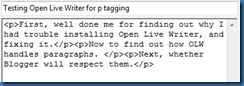
First, well done me for finding out why I had trouble installing Open Live Writer, and fixing it.

Now to find out how OLW handles paragraphs.

OpenLiveWriter automatically inserts proper p tags

Cool. So next, whether Blogger will respect them.

Saturday, November 04, 2017

Can I get '<'p'>' tags in Blogger? (Test 1)

Test 1: Write post in Docs with space before paragraphs & copy across?

Remember to either: never edit the html in Blogger, or if I do edit the html, do not return to Compose view before publishing.

This is a bit of a nuisance, but could it be a way to keep my first blog, and my tags too?

Result: NO

Friday, July 28, 2017

Back? Maybe

I had forgotten the problems managing post content in Blogger, because <p> tags keep disappearing. I seem to recall reading a suggestion that it is the Blogger editor at fault.

And I forgot how *&^%$#@! bad that gets when I want to structure my content around images:

1. put tags in HTML editor


2. switch to Compose view = no paragraphs


3. switch back to HTML view = tags gone.


This seems like a fairly significant problem--one that may send me looking elsewhere, maybe switching to WordPress.com if I leave WordPress.org .

However -- if it is possible to blog here easily using a better editor, perhaps I could happily return. Do you have any suggestions?

Sunday, July 09, 2017

I'm baaaack

Later, maybe, more on why and how...
 In the meantime, I'm listening to (and occasionally watching) [Update 14 June 2021 - formerly shared video is no longer available at Youtube]
Motiversity. (2017). Best Motivational Speech Compilation EVER #4 - GET BACK UP - 30-Minute Motivation Video #5. Retrieved from https://www.youtube.com/watch?v=lgS0JG2cgWU

Friday, July 31, 2015

#\:D/ : Screenshooting, cursor too

...with IrfanView

While Snipping Tool still delights me, today I learned to Capture a Screenshot with IrfanView that shows the mouse cursor! ... \:D/

In brief:

Open Irfan View -> Options -> Capture/Screenshot (check/modify settings)  
-> Start -> Ctrl-F11

To clarify: the settings to manage screen capture in IrfanView are accessed through the Options menu, being sixth available option if canvas is blank.

Settings

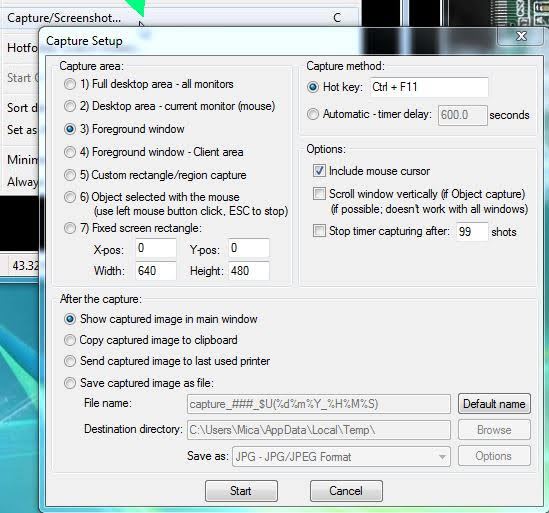
Capture Setup has many controls. I set the capture area to Foreground window. I left capture method at default Hot Key CTRL+F11. I left default at including mouse cursor. And after the capture show in main window of IrfanView.

IrfanView Capture Setup has four bundles of options. Capture Area has seven types from full desktop area to a fixed screen rectangle. Capture method can be by hotkey or automatic on timer. After the capture offers four options, to show, copy to clipboard, send to printer or save. Finally in addition to default mouse cursor, two other options area to scroll window and set when to stop, if filming.


Yes will need to crop

But cropping--once I realised* how (when there is an image on the canvas and no paint tools selected, just left click drag, let-go, Ctrl+Y)--is also rather nifty in IrfanView, offering (via Edit -> Show selection grid) a golden ratio grid.


*(thanks to Lord Spam Magnet & Grinler at BleepingComputers)

PS - if you were wondering

  • \:D/ in title is a Happy Dance
  • the screenshot for which I wanted a cursor...
    Pasting values only (or paste as plain text) in Google Sheets
    ...relates to a possible future post about importing+keeping Google Search results for a google portion of a literature review.

Part of my Wordpress→Blogger journey, this post copied (because it remains relevant today) 19/07/2019 in republication of my 31 July 2015 post at my experimental self-hosted Wordpress where it achieved 24 views.


Monday, July 27, 2015

Flight #NLS7 LANDED Post-flight check

So many things to do, ASAP:

  1. Reconnect with loved ones (my lovely sons picked me up from the airport late last night)
  2. Respond to anything urgent that arose while I was gone (nope, all clear)
  3. Unpack & clean (mm, in progress)
  4. Sit, rest, think (perhaps next weekend)
  5. Thank the organisers:
  6. Transfer notes - particularly capturing Action items (see posts to follow) (or I might add to the NLS7 Etherpad Stephen Chang started)
  7. Thank presenters and participants (see posts to follow)
  8. Report to and thank funder (me, this time--but I may still prepare a report).

What do you do when you return from conference?

* OMG YUM - Thank you Pot Belly - that was possibly some of the yummiest food I have ever eaten.


Part of my Wordpress→Blogger journey, this post copied 26/12/2020 in republication of my 27 July 2015 post at my experimental self-hosted Wordpress where it achieved 22 views.


Original post received 1 comment which I will append here:
(but if any of you want me to delete yours from this republished version, please tell me)

Cecilia said:
29 July 2015 at 11:13 pm
I am looking forward to my big conference. Hope it is as well catered for as yours. Favourite librarian can you please show me how to do an excel spreadsheet without my brain collapsing?

Wednesday, June 17, 2015

DIY desktop icons with IrfanView #blogjune

Three of my custom desktop icons and IrfanView
No fuss, no bother,

IrfanView quickly converts my .jpg images to .ico ; giving me visually meaningful desktop icons.

Recently I became interested in customising my desktop icons. Specifically (so far): shortcuts to webpages which otherwise would, by default, show the browser's icon. Regular readers may recall that Mr 17 helpfully photoshopped two creative commons images into one; and that it was only after much fuss I found an online converter [no longer available (2020)] to achieve an .ico file.

... and more (later)...

Apparently IrfanView is capable of tons more than this little thing I needed.  It will come in handy:

    • when I have time to learn about optimising (beyond cropping and resizing images with Paint to 500px or less before uploading)
    • or for working with layers? (see if I can stretch beyond the gimp tutorials with which I made a couple of textures for SecondLife).
2015 Homescreen of IrfanView where I see it also creates slideshows and more

How simple?

For future reference, with IrfanView icons are a simple matter of:

File, Save Picture As, .ico

File, Save Picture As, .ico [and Discovered 25/12/2020: Both ico options checked]

Thanks Irfan.

Will he earn a place on my toolbar?
[Update 25/12/2020 - he did :-D]

Part of my Wordpress→Blogger journey, this post copied 25/12/2020 in republication of my 17 June 2015 post at my experimental self-hosted Wordpress

Tuesday, June 02, 2015

Sons are useful for... making icons

Or: Mothers and sons learn together

Can I?...

My calendar is in Google calendar. A shortcut on my desktop lets me open it in Chrome with one click.  Of course, then I decided I wanted a special calendar icon for it.  I wanted a calendar in the middle of a chrome icon. Yes a calendar icon would have been simpler but I had a notion of it needing to look similar to the shortcut I have at work.

Would you?

This is where my digital-media-trained and his Photoshop skillz comes in.

That's great but ...

Unfortunately his beautiful combinations looked fine in photoshop, but the first opened at my end with a black background, another had a white background, and when we tried to save as .ico in bmp or png formats (because Photoshop CC did not seem to be able to save to .ico) some showed no image at all.

Trial and error

Some of the clues we tried:

  • Ryan at StackExchange suggested that we must first save the .png files to the computer, and then open them with Photoshop (during copy paste techniques Photoshop converts the transparency to black).
  • Although my issue does not involve WordPress as did Mike Lee's 2012 issue with the black turning up when he resized images, I wondered from his problem statement whether I might eliminate resizing as a possible cause by using images that were already the desired size. That appeared to help, but we were working through ideas so quickly I am not sure if it was required, because for the one below Mr 17 did resize one of the source images.  I'd have preferred a blue calendar, but could not find one the right size licenced for reuse.
Calendar in Chrome icon
Image (pre-iconised) I use for shortcut to Calendar in Chrome
    • The file format issue was the last problem, [which was solved by a webtool which has since (by 2020) been 'deprecated' - I would now use IrfanView or icoconvert.com].

Source images are from Wikipedia: (Calendar) and (Chrome).


Part of my Wordpress→Blogger journey, this post copied 25/12/2020 in republication of my 2 June 2015 post at my experimental self-hosted Wordpress


Tuesday, June 10, 2014

The most challenging thing about today was … #blogjune

Thanks sis. The contemplating caterpillar suggested I share the most challenging thing about today.

? ... ?

Challenging: testing one's abilities.

Wanted :

I wanted a way to extract data from particular cells in multiple workbooks to give me an index to the content of those books (which are named with numbers).

Solved:

I had no prior background in VBA, but with a rough question google helped me find a macro by Ron deBruin that I guessed might do something like that... then I worked out how to edit the macro, then how to run it.

The Country Town, 2000 piece jigsaw puzzle
This big (2000 piece) old puzzle and my job have much in common.
(The puzzle is called "The Country Town" by Tower Press. (c.1960). )

But the post title is also true, #blogjune may arguably be the most challenging: it is taking longer, has looser parameters, and its hard to know when its done.

Payback, sis:

What makes some challenges enjoyable, but others unpleasant.


Part of my Wordpress→Blogger journey, this post copied 25/12/2020 in republication of my 10 June 2014 post at my experimental self-hosted Wordpress