Received another reminder about WP host renewal coming up in 29 days. I won’t get it done in time with the current plan. Began wondering whether perhaps I could split the plan,
Focussing on getting my content out ;
(later) uploading to Blogger.
To be able to do 2 the way I want I will need from and for each post:
Webarchive link of original post (except for drafts)
HTML of original post (prob save to Notepad files)
Capture images
To celebrate the idea, here is a photo I took on this day 5 years ago - this time of year being a jigsaw fest with GUF. Hm, I was going to embed it from my Flickr account; *but* Flickr has been at risk in the past, and while it has so far survived, it might not, so perhaps I ought not rely on it.
While doing this, I'm also going to see whether HTML 5 figure element will let me align a caption as I wish:
1000 piece jigsaw of a bridge and cottage in photo titled Llanwrst, North Wales, by Andy Williams, published 2014 by Crown & Andrews {Leisure Wise} : Rydalmere, NSW
.., find a tool I learned about then is apparently a deprecated project, so lots of relearning...
goal
I wanted to show and tell my "customised a desktop icon to my own Flickr" story but the dots are trademarked by Yahoo. I don't know if that would mean one couldn't show non-commercial images incorporating the dots - but I also don't want to spend the time checking, so I erred on the side of caution.
For illustration I contemplated other icon customisations. Say, place the ALIA starry thing in the centre of a Chrome circle for the shortcut to my ALIA PD Drive folder. But - mm no - Chrome is probs trademarked too. I might still do it to practice the technique, but won't show it :-(
I wanted to layer two side by side coloured circles over my scaredydragon and have the combination in a circle with transparent background as an .ico file.
What I did
So while I can't show you the end result, I can share videos to illustrate what I learned.
Also note it took many rinse and repeats to select the precise portion of the picture (the dragon's face and ears) that I wanted to show in the eventual circle, into the necessary part of the intervening square. And for the memory file, that involved, in IrfanView:
load image (open folder) browse
(too small , resize up =Ctrl+R or Image > Resize/Resample
I only want his face, so Shift+C Create Custom Crop Selection size 256 x 256 *
--repeat those steps until the original resize was such that the custom crop grabbed what I wanted.
Next step back to Powerpoint to get another circle, but Powerpoint won't save it as an .ico.
So I went back to IrfanView to change the png to .ico, but the conversion seems to have left a jagged edge. Still ... I am super happy I have an ico that makes my desktop shortcut icon visually meaningful.
When I look more at ICOconvert online it seems they also offer cropping and Styling which includes circles - so I wonder if the special shape styles come with transparency? Maybe I'll try it out soon. No hurry because I did try their tab for "Multiple PNGs to one ICO" but it had no upload mechanism.
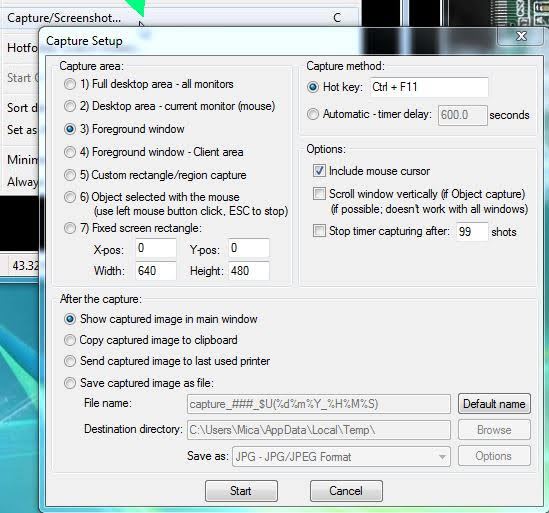
While Snipping Tool still delights me, today I learned to Capture a Screenshot with IrfanView that shows the mouse cursor! ... \:D/
In brief:
Open Irfan View -> Options -> Capture/Screenshot (check/modify settings)
-> Start -> Ctrl-F11
Settings
Capture Setup has many controls. I set the capture area to Foreground window. I left capture method at default Hot Key CTRL+F11. I left default at including mouse cursor. And after the capture show in main window of IrfanView.
Yes will need to crop
But cropping--once I realised* how (when there is an image on the canvas and no paint tools selected, just left click drag, let-go, Ctrl+Y)--is also rather nifty in IrfanView, offering (via Edit -> Show selection grid) a golden ratio grid.
the screenshot for which I wanted a cursor... ...relates to a possible future post about importing+keeping Google Search results for a google portion of a literature review.
My calendar is in Google calendar. A shortcut on my desktop lets me open it in Chrome with one click. Of course, then I decided I wanted a special calendar icon for it. I wanted a calendar in the middle of a chrome icon. Yes a calendar icon would have been simpler but I had a notion of it needing to look similar to the shortcut I have at work.
Would you?
This is where my digital-media-trained and his Photoshop skillz comes in.
That's great but ...
Unfortunately his beautiful combinations looked fine in photoshop, but the first opened at my end with a black background, another had a white background, and when we tried to save as .ico in bmp or png formats (because Photoshop CC did not seem to be able to save to .ico) some showed no image at all.
Trial and error
Some of the clues we tried:
Ryan at StackExchange suggested that we must first save the .png files to the computer, and then open them with Photoshop (during copy paste techniques Photoshop converts the transparency to black).
Although my issue does not involve WordPress as did Mike Lee's 2012 issue with the black turning up when he resized images, I wondered from his problem statement whether I might eliminate resizing as a possible cause by using images that were already the desired size. That appeared to help, but we were working through ideas so quickly I am not sure if it was required, because for the one below Mr 17 did resize one of the source images. I'd have preferred a blue calendar, but could not find one the right size licenced for reuse.
Image (pre-iconised) I use for shortcut to Calendar in Chrome
The file format issue was the last problem, [which was solved by a webtool which has since (by 2020) been 'deprecated' - I would now use IrfanView or icoconvert.com].
Source images are from Wikipedia: (Calendar) and (Chrome).