![Bilbo: Back again... [water colour by Kinko-White] beautifully conveys how I feel about coming home to this blog after my adventure in self-hosting elsewhere](https://blogger.googleusercontent.com/img/b/R29vZ2xl/AVvXsEjhyn-_2mmRan61Nr4q6stTi7NEKyOx5UQ3W-OsHZ10f6yAppA2p-2WlOrRh7qXtMwDX_L9q-BBA7Xn_d6q8dZCHNtoNVbvGOuwoHEHVtWip5ExWMRvCJ6zCGNLQhc1xXWeXM9OoA/?imgmax=800 "Bilbo: Back again... by Kinko-White")
Who cares?
I hope anyone else who lands here after pondering whether to switch from Wordpress.org to Blogger comments below – so we can compare thoughts. Were you wondering how, or why? Are there as few articles about that journey now as there were when I searched--let alone any promise of ease in such a transition?
During my search for tips back in July 2017 I found that my experiences and rationale almost totally matched Jenn’s Wordpress—>Blogger transition story, even to the fact that Google assumed I really meant to ask about switching the other way. (Did hers happen in 2014, or was the post re-dated when she shifted it with her blog, Hello Brio over to Squarespace?) Like Jenn, I want to tell you why ; and in case she decides to ditch that post, I will reflect on her suggestions.
Why I decided that the experiment with self-hosted Wordpress was over
--posting infrequency + not finding the right handle for a static portfolio = insufficient value for $$$
--under my name = wanting it to be perfect
--struggle to get it "just right" too time consuming
--needing to spend less time at the computer
Why I am switching [back] to Blogger from Wordpress (despite the p tag issue).
- Nostalgia. I loved learning to blog here, and have fond memories of when some of my posts made a difference to people.
- I still have a hefty collection of posts here, which people are still reading.
- It is free.
- I think Blogger can do more now than it did then, but I do not need most of the extra functionality self-hosted Wordpress could do.
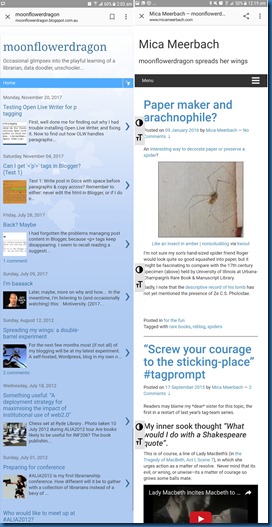
- moonflowerdragon.blogspot looks better on mobile than micameerbach.com
As Jenn suggested, I reconsidered my goals:
- Return to one FREE online spot
# no particular deadline, although the sooner it is done the sooner I can stop paying for the other domain, yet let’s give enough time to be sure it will work comfortably. - See whether I return to posting more frequently under the pseudonym
- It was always about skills/professional development, and it still is, with a few new questions:
- What would it take for a blogspot site to be a professional advantage rather than the opposite?
- How much of that which I did at micameerbach will remain relevant if republished?
- Are any of those posts that stayed so long in draft worth actually posting?
How I plan to switch from Wordpress back to Blogger = Slowly
Tracy Thomason over at 15 Minute Monday posted about exporting one’s files to move from Wordpress to Blogger.
However, I figured that as I would need to check each post for peculiarities anyway, I might as well consider each of the 111 posts (61 published, 49 drafts, 1 private) manually.
Those peculiarities?
- both Jenn and Tracy mentioned that image URLs don’t transfer
- inbound links would be broken
- internal links would be broken
- comments would have to be exported or mapped over
First: I made sure that the Internet Archive WaybackMachine is capturing micameerbach occasionally – some busy posting months were not captured at first, but the Internet Archive WaybackMachine lets us add.
Second: This post here, and a (semi)final post there
Third: Up to 111 iterations of:
- Pick a post, either the next highest viewed, or any post,
- Check whether its URL is cited anywhere else online.
- Read it,
- Consider: does it offer or demonstrate anything useful?
If it is worth transferring,
- in html view, copy and paste everything across to a new post here, but in Open Live Writer (unless Google decide to support p tags in their Blogger editor),
- append note about where I had originally posted it, perhaps hyperlink to archive version?
- reupload photos and basically re-link everything.
- retag & add tag Republished_from_micameerbach
- Do not try to anticipate whether formerly internal links will also be transferred, just relink to their WaybackMachineversion, and note them in a Google Doc for later checking
- At old post append note about and linking to republication
- At old post tag with Republished_at_Moonflowerdragon – let’s me track which ones I’ve done.
- If the URL was cited anywhere, contact citers to inform them of new post/archive to avoid broken link.
If it is not worth transferring,
- Check whether it is at WaybackMachine
- If similar topics/posts here, append at top – link to tag/post]
- Tag as Not_republishing
- If the URL was cited anywhere, contact citers to inform them of archive version.
For drafts, I could just copy & publish, but that would not help answer the learning questions above, so I could
- if publishing: tag it something like drafted@mm / published@MFD
- if not publishing, don’t delete but tag it notpublishing@MFD
Finally: Unless I give up earlier, when all 111 iterations are complete:
- Count the tags & maybe talk about what if anything I got out of the process
- Wind up that account
- Celebrate
Image Credit: The beautiful watercolour above is “Bilbo: Back again…” by Kinko-White who kindly gave me permission (via shuzzy) to use it here to symbolise my return home here after an adventure.